Keep every room in order
Explain where you are as you record. XactSight groups the draft findings by room and location, ready for you to check.
Snagging schedules
Turn your walkthrough photos and voice notes into a snagging schedule organised by room. Capture the defects on WhatsApp, then review the evidence, priorities and remedial actions in one clear document.
Explore the sample without signing in.
For snagging inspectors, developers and site quality teams
Plot 14, Oakfields Development, Chelmsford CM1 4XQ
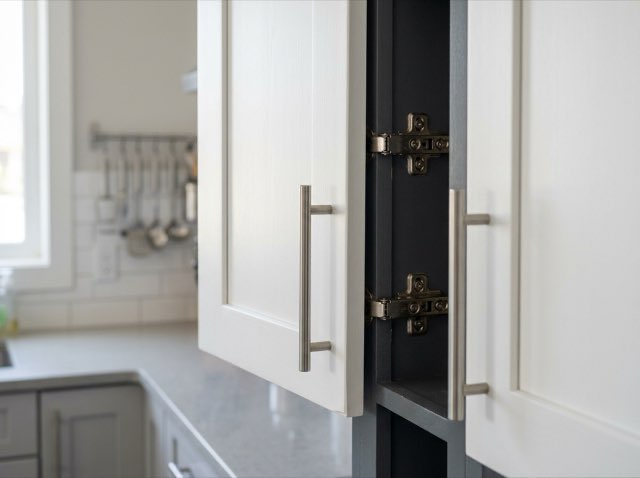 01 / Sample finding
Upper kitchen unit door sits proud of adjacent carcass by approximately 3mm.
Builder to adjust hinges and realign door
Sample data · Condensed preview · Open the full sample
Less admin. A clearer result.
Explain where you are as you record. XactSight groups the draft findings by room and location, ready for you to check.
Keep the description and supporting photos together. Give the person carrying out repairs useful context for each item.
Review the severity, priority and suggested remedial action for each defect before sharing the schedule.
What you get
A folder of photos leaves someone else to work out what needs attention. A structured schedule brings the location, defect and proposed repair into the same record.
How it works
Start on WhatsApp.
Finish in your browser.
Send your walkthrough, photos and voice notes on WhatsApp. Name the room and describe each defect as you go.
Check each location and finding. Refine the wording, severity, priority and remedial action, and organise the evidence.
Approve the schedule for this visit and export it with your branding, ready for the client, developer or site team.
Before your first report
Your expertise stays central.
Every report starts as a draft for review.
Yes. Each distinct defect gets its own finding and supporting evidence. XactSight can take room names from your narration, and repeated observations of the same defect are consolidated for your review.
You do. XactSight drafts possible defects from the material supplied. Review which findings belong in the schedule, then confirm their descriptions, severity, priority and proposed repair.
No. Each visit is a separate job and schedule. A new report does not compare against the previous visit or automatically mark earlier defects as resolved.
The snagging format focuses on defects and remedial actions, rather than prices. Choose the job report and quote format when you need to prepare a priced scope of work.
Yes. Open the editable snagging sample without signing in to explore its rooms, findings and evidence. Early access for your own visits is not open yet; join the list for an email when it opens.
See the result for yourself
Explore the sample today. Join the list to hear when early access opens.