Less writing after the visit
Describe the work while it’s in front of you. XactSight organises your observations into a draft, so you can spend your time checking the details.
Job reports & quotes
Turn the photos, videos and voice notes from your site visit into a clear job report and an itemised draft quote. Send them on WhatsApp, review the details and put your name on the finished documents.
Explore the sample without signing in.
For builders, repair teams and specialist trades
124 High Street, Manchester M1 4BT
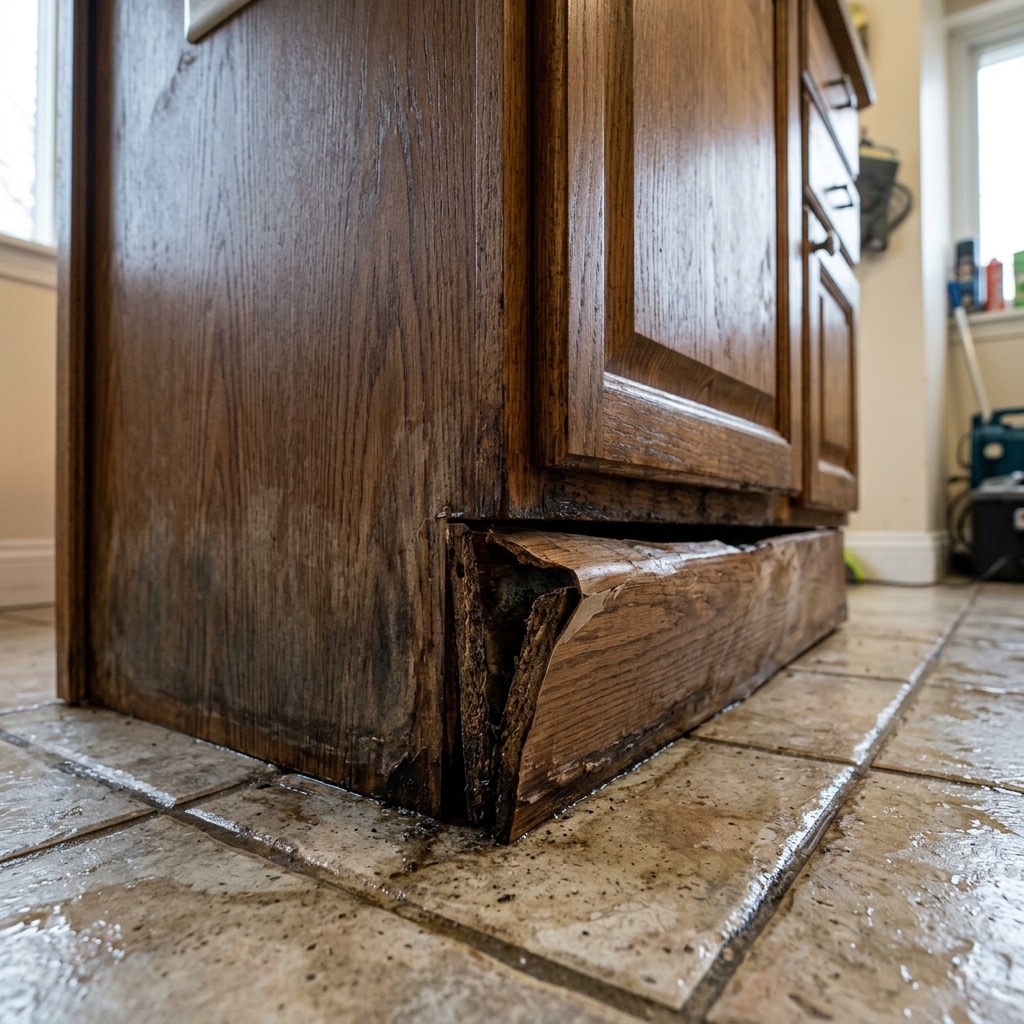 01 / Sample finding
Staining and swelling along the plinth line immediately after the reported leak. MDF boxing is soft to touch for approximately 400mm from the corner. Moisture reading: 24% at 09:18.
Sample data · Condensed preview · Open the full sample
Less admin. A clearer result.
Describe the work while it’s in front of you. XactSight organises your observations into a draft, so you can spend your time checking the details.
Bring the findings, supporting photos and recommended work together. Help your client understand the job behind the quote.
Start with an itemised quote in pounds. Review every line, adjust the scope and confirm the price before sending it to your client.
What you get
Photos and notes are only the starting point. XactSight turns them into a report that explains the visit and a separate quote that sets out the proposed work.
How it works
Start on WhatsApp.
Finish in your browser.
Send site videos, photos, voice notes and text on WhatsApp. Explain what you found and the work you recommend.
Open your draft in the browser. Edit the findings, scope, prices and terms, and add your company branding.
Mark the documents final when you’re happy with them. Download a PDF or Word file to share with your client.
Before your first report
Your expertise stays central.
Every report starts as a draft for review.
You set the price you send. Quote lines distinguish figures you supplied from estimates generated as a starting point. Check the scope, quantities, rates, tax and exclusions before issuing a quote; estimates are not binding prices.
Yes. Send photos, videos, voice notes or text, together or separately. Add enough detail about the location and proposed work to give the draft useful context.
Yes. Edit the summary, findings, evidence, quote scope and terms. Your company profile supplies your logo and contact details, and you can choose a report and quote layout before exporting.
You can send videos, voice notes and text in your preferred language. XactSight drafts the report and quote in English. Check names, measurements and technical details during review.
The sample report and quote are available without signing in. You can edit the sample in your browser. Join the early access list to hear when you can use XactSight for your own jobs.
See the result for yourself
Explore the sample today. Join the list to hear when early access opens.